
Voice Generator
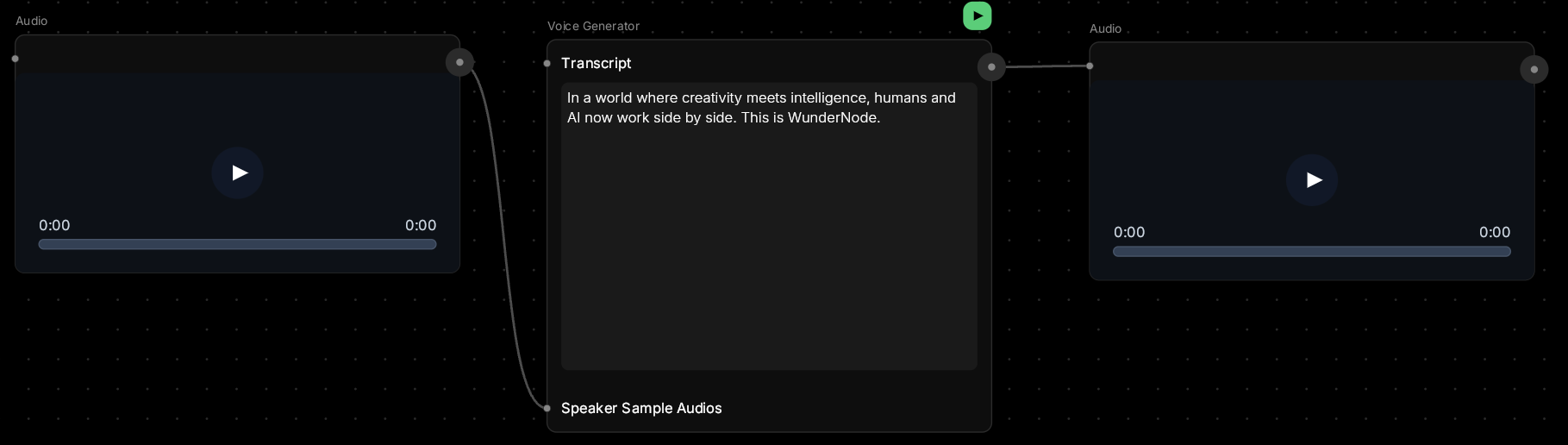
Give your words a voice.This node turns text into natural-sounding speech. You can use a default voice, or clone your own (or someone else’s) by uploading audio samples. Perfect for narration, character dialogue, or any time you need spoken audio.
🪄 When to Use It
Use Voice Generator when you need spoken audio without recording. It works great for:- Voiceovers — narration for videos or presentations
- Character dialogue — give your characters unique voices
- Podcasts and audio content — scriptable speech
- Dubbing — create audio in different voices
- Prototyping — test dialogue before recording real actors
Average time: 10–30 seconds depending on text length
Cost: Low-Medium
🎚️ Controls and Parameters
Transcript (Text, Required)
The text you want spoken. Write it naturally, with punctuation for pacing. 💡 Tip: Add commas for pauses, periods for longer breaks. “Hello, how are you?” sounds more natural than “Hello how are you” Supports up to 2 speakers — label them in your transcript:Speaker Sample Audios (Array, Required)
Upload 1-2 audio clips (5-15 seconds each) of the voice(s) you want to clone. 💡 Tip: Use clear, quiet audio with consistent tone. Avoid background music or noise.- 1 sample — clones one voice
- 2 samples — supports dialogue between two different voices
Voice Speed (Slider)
How fast the speech should be:- 0.8 — slower, deliberate
- 1.0 — normal conversational pace
- 1.2 — faster, energetic
CFG (Slider, 0–5)
Controls how closely the AI follows your voice sample:- Low (0.5–1.0) — more creative variation
- Medium (1.3) — balanced (recommended)
- High (2.0+) — very close match to sample
Temperature (Slider, 0–1)
Controls speech variation and expressiveness:- Low (0.5–0.7) — consistent, monotone
- Medium (0.95) — natural variation (recommended)
- High (1.0) — more expressive, less predictable
Seed (Number)
Control randomness. Same seed + same inputs = same result.🎨 Available Models
Vibe Voice (Default)
Advanced voice cloning and text-to-speech engine with natural intonation and emotion. Features:- Clone up to 2 different voices from audio samples
- Multi-speaker support with speaker labeling
- Fine control over speed, CFG, and temperature
- Natural-sounding prosody and emphasis
🎨 What to Expect
Voice cloning captures the tone and timbre of your sample audio, but it’s not a perfect match.The AI will:
- Mimic the pitch and character of the voice
- Follow the pacing and emphasis in your transcript
- Handle most common words naturally
- Very long, complex sentences
- Unusual names or technical terms
- Extreme emotional range (shouting, whispering)
- Use clean audio samples with no background noise
- Write clear, natural-sounding text
- Keep sentences reasonably short
💬 Quick Tips
- Record your voice samples in a quiet room with consistent tone
- 10-15 seconds of sample audio is usually enough
- Write your transcript the way you’d naturally speak it
- Use punctuation to control pacing (commas = short pause, periods = longer pause)
- For dialogue, clearly label speakers in your transcript
- Generated audio matches the length of your text — longer text = longer processing time